
0 ratings
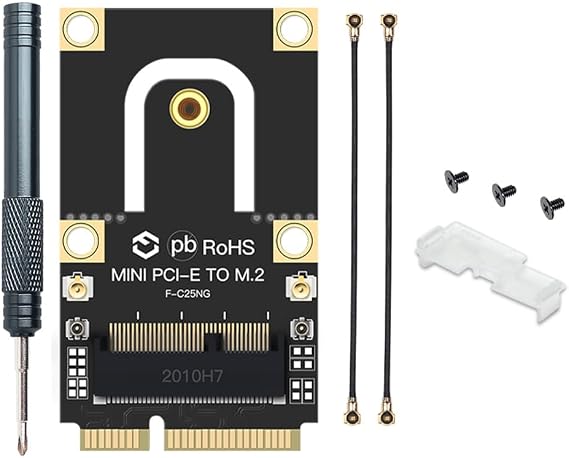
M.2 to PCIe Converter for Laptop NGFF M.2 Key A+E WiFi Bluetooth Card to Mini PCI-E Converter Adapter Make Your M.2 WiFi Card on laptops 2010-2016 Laptops Based on PCI Express Solt
This M.2 to PCIe Converter allows you to install your M.2 WiFi card inside your laptop.
M.2 to PCIe Converter for Laptop NGFF M.2 Key A+E WiFi Bluetooth Card to Mini PCI-E Converter Adapter Make Your M.2 WiFi Card on laptops 2010-2016 Laptops Based on PCI Express Solt

M.2 to PCIe Converter for Laptop NGFF M.2 Key A+E WiFi Bluetooth Card to Mini PCI-E Converter Adapter Make Your M.2 WiFi Card on laptops 2010-2016

0 ratings Write a review
Out of stock
us Imported from USA store
Our Top Logistics Partners
  • fedex
  • dhl
This M.2 to PCIe Converter allows you to install your M.2 WiFi card inside your laptop.
U-Care Warranty:
None
Select a Plan
fast shipping

Fast
Shipping

free return

Free
Return*

secure packaging

Secure Packaging

100% original products

100% Original Products

pci-dss

PCI DSS Compliance

iso certified

ISO 27001 Certified


paypal payment
visa payment
mastercard payment
Note: Step Down Voltage Transformer required for using electronics products of US store (110-120). Recommended power converters Buy Now.

What Stands Out

Versatile Compatibility
Seamlessly convert M.2 WiFi cards for use in laptops from 2010 to 2016, ensuring widespread compatibility across various brands and models while enhancing your device's wireless capabilities.
Easy Installation
Designed for quick and straightforward setup, this adapter requires no advanced technical skills, making it accessible for users seeking to upgrade their laptop's wireless performance effortlessly.
Enhanced Connectivity
Supports both WiFi and Bluetooth functionality, allowing users to experience faster internet speeds and wireless connections, resulting in better performance and efficiency for everyday tasks.

Product Details

Upgrade Your Laptop WiFi Card with M.2 to PCIe Converter. Convert M.2 Key AE Card to Mini PCI-E and improve your laptop's wireless connectivity. Available now on Ubuy Laos.
  • Converts M.2 WiFi card into mini PCIe port on laptops (2010-2016)
  • Compatible with Intel AX200, 9260, 8260 and Killer M.2 WiFi cards
  • No need to purchase MHF4 antenna, as converter has its own antenna port
  • Supports transfer of MHF4 antenna port to IPEX1 antenna port
  • Requires a mini PCIe slot that is at least 43mm long and 30mm wide
  • Not compatible if the available slot is too small for the current WiFi card
Package Weight1.0000 Pound

Who Should Buy?

Suitable For
  • Upgrading WiFi

    Ideal for users wanting to boost their laptop's WiFi capabilities using modern M.2 cards.

  • Affordable Upgrade

    Cost-effective solution for enhancing laptop performance without purchasing a new device.

  • Older Laptop Users

    Perfect for individuals with laptops from 2010-2016 needing compatibility with newer hardware.

Not Suitable For
  • Newer Laptops

    Not suitable for laptops released after 2016 that support M.2 slots natively.

Product Description

M.2 to PCIe Converter for Laptop NGFF M.2 Key A+E WiFi Bluetooth Card to Mini PCI-E Converter Adapter Make Your M.2 WiFi Card on laptops 2010-2016 Laptops Based on PCI Express Solt

Have any Query? Chat with us

Customer Questions & Answers

  • Question: What is an M.2 to PCIe converter and how does it work?

    Answer: An M.2 to PCIe converter is an adapter that allows you to connect M.2 NGFF WiFi and Bluetooth cards to a Mini PCI-E slot in laptops. This is particularly useful for enhancing older laptops that do not support M.2 out of the box. The converter effectively bridges the two connection types, facilitating better connectivity options. Many users upgrade their laptops from 2010 to 2016 with modern wireless cards to improve internet speed and stability.
  • Question: Is this adapter compatible with all NGFF M.2 WiFi cards?

    Answer: Yes, this adapter is designed to be compatible with most NGFF M.2 Key AE WiFi Bluetooth cards. However, it's important to check the specifications of your M.2 card to ensure it's Key AE compatible. This is particularly beneficial for users who want to upgrade their wireless capabilities without replacing the laptop itself. For best results, consult the product documentation of your WiFi card and the laptop before installation.
  • Question: Can I use this adapter on laptops from different brands?

    Answer: Absolutely! This M.2 to PCIe converter works with laptops from various brands that have a Mini PCI-E slot, but check your laptop’s specifications for compatibility. The versatility of this adapter makes it an excellent choice for a wide range of laptop models. Users commonly install it on Dell, HP, Lenovo, and Acer laptops from 2010 to 2016, making it a popular choice for performance upgrades across several laptop brands.
  • Question: What performance improvements can I expect after using this converter?

    Answer: Using this converter to install an M.2 WiFi card can lead to significant performance improvements. Modern M.2 cards often support faster speeds and better connectivity options compared to older Mini PCI-E cards. This can translate to reduced latency, better streaming quality, and overall superior internet performance, which is especially noticeable for tasks such as gaming, video conferencing, or high-definition streaming.
  • Question: What should I check before installing the M.2 to PCIe converter?

    Answer: Before installation, ensure your laptop has a Mini PCI-E slot and check the M.2 card compatibility (it should be M.2 Key AE). Additionally, consider the physical space within your laptop to accommodate the converter and M.2 card. By confirming these details, users can avoid potential installation issues. It’s also advised to have the necessary tools handy, like a screwdriver, to facilitate the installation process.
  • Question: Are there specific installation procedures I need to follow?

    Answer: Yes, proper installation is key. Begin by turning off your laptop and disconnecting it from the power source. Open the back panel to access the Mini PCI-E slot, securely connect the M.2 to PCIe converter, and then attach your M.2 card to the converter. Ensure all connections are snug and that there are no loose components. Following these steps minimizes the risk of hardware damage and ensures a successful installation.
  • Question: Does this converter support both WiFi and Bluetooth M.2 cards?

    Answer: Yes, this M.2 to PCIe converter supports both WiFi and Bluetooth M.2 cards, typically designed with Key AE. This is particularly advantageous for users looking to upgrade their laptops’ wireless capabilities. Many modern users take advantage of this dual functionality, especially when looking to integrate seamless connectivity in various applications like remote work or media streaming.
  • Question: How do I ensure proper functionality after installation?

    Answer: After installing the adapter and M.2 card, check your laptop's Device Manager to ensure the new hardware is recognized and the drivers are properly installed. Updating or installing the appropriate drivers may be necessary for optimal performance. Users often find they need to reboot their systems for full functionality, enabling them to immediately benefit from the upgraded wireless speeds.
  • Question: Can I buy the M.2 to PCIe converter in Laos?

    Answer: Yes, you can purchase the M.2 to PCIe converter for your laptop in Laos through Ubuy. Ubuy offers a convenient platform to find this adapter, ensuring that it fits your specific needs. Additionally, shopping through Ubuy provides access to detailed product descriptions, customer reviews, and competitive pricing, making it easier for you to make an informed decision.

YOUBO Network Cards Editorial Review

No editorial reviews found

Customer Reviews & Ratings

5.0
1 customers ratings
  • 5 Star
    100%
  • 4 Star
    0%
  • 3 Star
    0%
  • 2 Star
    0%
  • 1 Star
    0%

Review this product

Share your thoughts with other customers

Platform Trust & Buyer Confidence

trustpilot logo
4.3/5 9200 + reviews
Read reviews
MA
Mohammad
Verified buyer

“Excellent quality and original too,when ubuy send original things I will appreciate that ,I very satisfied thank you”

23 July 2026 · via Trustpilot
CK
Chitra
Verified buyer

“The order and delivery progress was communicated very well. Package arrived within the estimated time. Products arrived as expected in good condition.”

22-Jul-26 · via Trustpilot
K
kund
Verified buyer

“Good supply of products. Safe payment methods, and shipment worldwide! Genuine products.”

23-Jul-26 · via Trustpilot
OO
Onesi
Verified buyer

“Was my first time buying a product from Ubuy, but I found it so helpful. This is reliable. Gonna place a new order!”

22 July 2026 · via Trustpilot
SJ
SAO JOHN
Verified buyer

“Ubuy is a great online platform to buy stuff. Reliable, fast delivery time and great value for money. I've been using Ubuy online shopping platform for three years now and will continue to do so.”

23 July 2026 · via Trustpilot
Secure Checkout Global Delivery Easy Returns Genuine Products

Important information

  • Limitations : For products shipped internationally, please note that any manufacturer warranty may not be valid; manufacturer service options may not be available; product manuals, instructions, and safety warnings may not be in destination country languages; the products (and accompanying materials) may not be designed in accordance with destination country standards, specifications, and labeling requirements; and the products may not conform to destination country voltage and other electrical standards (requiring use of an adapter or converter if appropriate). The recipient is responsible for assuring that the product can be lawfully imported to the destination country. When ordering from Ubuy or its affiliates, the recipient is the importer of record and must comply with all laws and regulations of the destination country.
  • Not all the products listed on Ubuy are for sale, as Ubuy is a global search engine. Products are subject to export/trade regulations.