- Home Page /
- Office Products /
- Office Electronics /
- Scanner & Accessories /
- Computer Scanner /
- Flatbed Scanner /
- Canon Unit 102 Flatbed Scanner
0 ratings


Item #:
41332317
Canon Unit 102 Flatbed Scanner
72% of respondents would recommend this to a friend
Item #:
41332317
LAK 11980125
Price Details
Excluding Shipping & Custom charges ( Shipping and custom charges will be calculated on checkout )
*All items will import from US
0 ratings
Write a review
In stock
 Imported from USA store
QTY:
Order now and get it around Monday, October 05
Secured transaction
Ubuy works hard to protect your security and privacy. Our advanced payment security system ensures confidentiality by encrypting your information during transmission using AES (Advanced Encryption Standards) and SSL (Secure Socket Layer) protocols. Your payment details are 100% secure as we do not share your payment details with third party sellers.
Our Top Logistics Partners


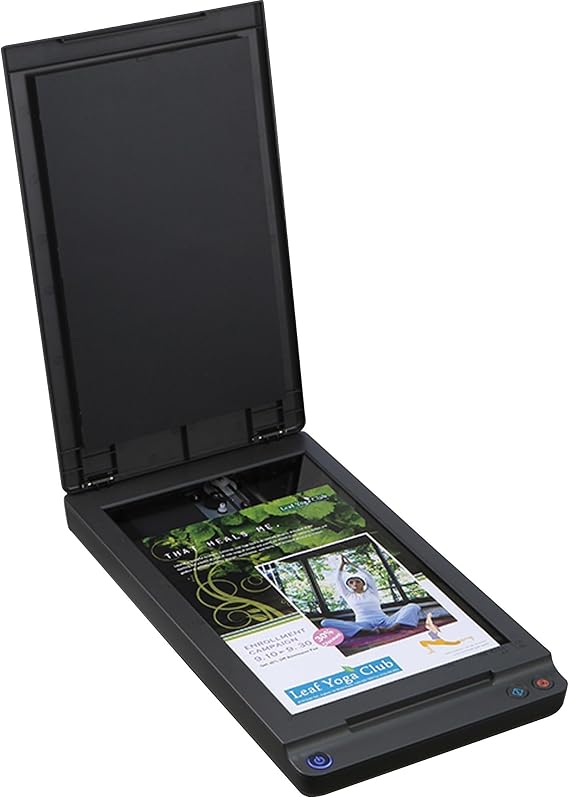
Flatbed Scanner Unit 102 widens the variety and types of documents that can be scanned including bound, thick and fragile documents.

Fast
Shipping

Free
Return*

Secure Packaging

100% Original Products

PCI DSS Compliance

ISO 27001 Certified



Note: Step Down Voltage Transformer required for using electronics products of US store (110-120). Recommended power converters Buy Now.


What Stands Out
High-Resolution Scanning
Offers exceptional detail with 1200 x 1200 dpi resolution, making it ideal for archiving documents, photos, and artwork with clarity.
Versatile Media Handling
Accommodates various media sizes and types, from business cards to large documents, ensuring flexibility and ease in scanning different materials.
User-Friendly Interface
Equipped with an intuitive control panel and software, simplifying the scanning process for both beginners and professionals, enhancing productivity.
Product Details
| Scanner Type | Business Card |
| Connection Type | Bluetooth |
| Resolution | 600 |
| Color Depth | 24 bits_per_pixel |
| Standard Sheet Capacity | 102 |
| Media Type | Paper |
| Item Weight | 5.5 pounds (2.49 kg) |
| Minimum System Requirements | Windows 7 |
| Brand | Canon |
| Model Name | Unit 102 Flatbed Scanner |
| UPC | 013803293012 |
| Unit Count | 1 Count |
| Global Trade Identification Number | 00013803293012 |
| Built-In Media | Unit 102 Flatbed Scanner |
| Item Type Name | Scanner Accessory |
| Manufacturer | Canon, Inc |
| Connectivity Technology | Bluetooth |
Who Should Buy?

-
Home Offices
Ideal for home office setups needing efficient document scanning for organization and digital archiving.
-
Small Businesses
Great for small businesses that require reliable scanning capabilities for paperwork and presentations.
-
Artwork Preservation
Perfect for artists wanting to digitize their artwork with high-quality scans for portfolios or online sharing.

-
High Volume Users
Not suitable for individuals or organizations needing to scan large volumes of documents quickly.
Product Description
Canon Unit 102 Flatbed Scanner
Have any Query? Chat with us
Customer Questions & Answers
-
Question:
What types of documents can the Canon Unit 102 Flatbed Scanner handle?
Answer: The Canon Unit 102 Flatbed Scanner is versatile, handling a range of document types including photos, books, and legal-sized documents. Its flatbed design allows for the scanning of delicate items and multi-page documents without causing damage, making it perfect for anyone needing professional quality. Whether you’re archiving family photos or digitizing important documents for work, you can rely on this scanner to provide high-resolution scans that retain the integrity of the originals. -
Question:
Is the Canon Unit 102 Flatbed Scanner compatible with Mac and Windows?
Answer: Yes, the Canon Unit 102 Flatbed Scanner is designed to be compatible with both Mac and Windows operating systems. It supports various software, including TWAIN drivers, which allows for easy integration with popular scanning applications. Users can seamlessly operate the scanner regardless of their computer preference, making it a suitable choice for mixed-device environments, like in offices that utilize both systems for document management and digital archiving. -
Question:
What is the maximum resolution of scans using the Canon Unit 102 Flatbed Scanner?
Answer: The Canon Unit 102 Flatbed Scanner offers an impressive maximum optical resolution of up to 4800 x 4800 dpi. This high resolution ensures that scans capture fine details and rich colors, perfect for photographers and graphic designers who need high-quality images. Scanning at this level allows for large prints and professional-grade output, ensuring that even the smallest details are preserved in each scan, making it ideal for artwork reproduction as well. -
Question:
Can you scan in color with the Canon Unit 102 Flatbed Scanner?
Answer: Absolutely! The Canon Unit 102 Flatbed Scanner can scan in both color and monochrome modes. This capability makes it an excellent choice for scanning vibrant photographs, intricate graphics, and detailed documents that require accurate color representation. Creative professionals can capitalize on this feature to create digital portfolios or presentations that require the vivid reproduction of colors, ensuring that the scanned images look true to the originals. -
Question:
Does the Canon Unit 102 Flatbed Scanner have any connectivity options?
Answer: Yes, the Canon Unit 102 Flatbed Scanner typically comes with USB connectivity for easy setup and operation. This direct connection allows for straightforward data transfer between the scanner and a computer, ensuring fast and efficient scanning processes. Additionally, some models may include software that facilitates scanning directly to cloud services, enhancing workflow for users who prefer digital organization and access to their documents from anywhere. -
Question:
What file formats can I save scans in using the Canon Unit 102 Flatbed Scanner?
Answer: You can save your scans in multiple file formats with the Canon Unit 102 Flatbed Scanner, including JPEG, PDF, and TIFF. This flexibility caters to various user needs; for instance, JPEG is perfect for web use, while PDF is great for sharing multi-page documents. Designers may favor TIFF for its uncompressed quality when working on detailed images. This capability allows users to choose the most suitable format based on their specific project requirements. -
Question:
What is the scanning speed of the Canon Unit 102 Flatbed Scanner?
Answer: The Canon Unit 102 Flatbed Scanner offers efficient scanning speeds varying between color and monochrome scans. Typically, it can scan a letter-size page in around 15 seconds. This efficiency is beneficial for users who need to digitize documents quickly, such as in busy office environments or during large archival projects. Users will appreciate how this speed helps streamline their workflow without compromising on the quality of the scanned images. -
Question:
Can I use the Canon Unit 102 Flatbed Scanner for photo restoration?
Answer: Yes, the Canon Unit 102 Flatbed Scanner is ideal for photo restoration. Its high-resolution scanning capability captures every detail, making it perfect for digitizing old or damaged photographs that require editing or restoration. Users can scan these historic images, and edit them using photo-editing software to restore their original colors and details. This is particularly useful for photographers or hobbyists looking to preserve family history and memories in a digital format. -
Question:
What software is included with the Canon Unit 102 Flatbed Scanner?
Answer: The Canon Unit 102 Flatbed Scanner usually comes with a suite of software, including Canon MP Navigator EX for easy management of scanning tasks and image editing. This software facilitates the scanning process and allows users to organize and edit scanned documents with features like OCR (Optical Character Recognition) for text extraction. With this included software, users enhance their productivity and ensure that they maximize the use of their scanner for diverse scanning needs. -
Question:
Where can I buy Canon Unit 102 Flatbed Scanner?
Answer: You can purchase the Canon Unit 102 Flatbed Scanner from Ubuy in Laos. Ubuy offers a wide range of products, competitive offers, and reliable customer service, making it a convenient option for your purchasing needs. By shopping at Ubuy, you can easily search for the Canon Unit 102 and explore the available options that suit your preferences and requirements.
Canon Flatbed & Photo Scanners Editorial Review
No editorial reviews found
Customer Reviews & Ratings
1 customers ratings
-
5 Star
100%
-
4 Star
0%
-
3 Star
0%
-
2 Star
0%
-
1 Star
0%
Review this product
Share your thoughts with other customers
Pros
- High scan resolution
- Easy to use
- Compact design
- Fast scanning speed
- Versatile media support
Cons
- Occasional software bugs
Platform Trust & Buyer Confidence

JK
Jasmin
Verified buyer
“Great products and very good service: very easy and very fast international delivery.”
9 September 2026 · via Trustpilot
AG
Anke
Verified buyer
“Wonderful online shopping experience, smooth transaction from the start. Payment method works conveniently and delivery is unexpectedly fast and reliable. You go the extra mile for service. What makes this even more amazing, you deliver to Namibia. I will remain a happy Ubuy customer and will increase my purchases for sure! Thank you!”
10 September 2026 · via Trustpilot
H
Hazel
Verified buyer
“Very easy to find the products what you need, and so fast delivery, that’s why I highly recommended to others costumers to used ubuy.”
10 September 2026 · via Trustpilot
O
Opaleye
Verified buyer
“I received exactly what I ordered I was skeptical about your site because that was my first time to order. But the order came timely and neatly packaged. I was not disappointed. Thank you.”
11 September 2026 · via Trustpilot
AC
Adele
Verified buyer
“Easy to find and order what you want on the website. Delivery is quick to the UK”
8 September 2026 · via Trustpilot
Secure Checkout
Global Delivery
Easy Returns
Genuine Products
Product Price History
Important information
- Limitations : For products shipped internationally, please note that any manufacturer warranty may not be valid; manufacturer service options may not be available; product manuals, instructions, and safety warnings may not be in destination country languages; the products (and accompanying materials) may not be designed in accordance with destination country standards, specifications, and labeling requirements; and the products may not conform to destination country voltage and other electrical standards (requiring use of an adapter or converter if appropriate). The recipient is responsible for assuring that the product can be lawfully imported to the destination country. When ordering from Ubuy or its affiliates, the recipient is the importer of record and must comply with all laws and regulations of the destination country.
- Not all the products listed on Ubuy are for sale, as Ubuy is a global search engine. Products are subject to export/trade regulations.
LAK 11980125
Order now and get it around Monday, October 05
This item is not restrict in my country.(Please click on above link if this item is not restrict in your country, So our team will review and allow.)
QTY:
Secured transaction
PCI DSS compliant and ISO 27001:2022 certified, with encrypted payments and full buyer protection on every order.
Our Top Logistics Partners
Fastest cross-border delivery
Features & Benefits
- Compatible with various Canon imageFormula models
- Detects color documents and page size automatically
- Improves scanning with features like Border Removal, Color Dropout/Color Enhancement, Deskew, Edge Emphasis, Moir Reduction and MultiStream
- Prevents bleed-through and removes background
- Offers text orientation recognition and text enhancement
- Scans a wide variety of document types
Ubuy Assurance
Experience worry-free shopping with 100% original products, PCI DSS-compliant payment security, ISO 27001-certified data protection, the fastest cross-border delivery, free returns *, and secure packaging on every order.