0 ratings




Item #:
6827485
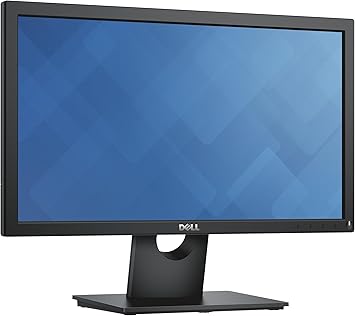
Dell E2016H 20" Screen LED-Lit Monitor,Black
Item #:
6827485
LAK 3247328
Price Details
Excluding Shipping & Custom charges ( Shipping and custom charges will be calculated on checkout )
*All items will import from US
0 ratings
Write a review
In stock
 Imported from USA store
QTY:
Order now and get it around Thursday, July 09
Secured transaction
Ubuy works hard to protect your security and privacy. Our advanced payment security system ensures confidentiality by encrypting your information during transmission using AES (Advanced Encryption Standards) and SSL (Secure Socket Layer) protocols. Your payment details are 100% secure as we do not share your payment details with third party sellers.
Our Top Logistics Partners


Fast
Shipping

Free
Return*

Secure Packaging

100% Original Products

PCI DSS Compliance

ISO 27001 Certified


Note: Step Down Voltage Transformer required for using electronics products of US store (110-120). Recommended power converters Buy Now.


Product Details
- Advanced screen performance
- Plug and view
- Mounting possibility
- Convenient controls
- Reduced footprint
- Mounting type: VESA-mount
| Aspect Ratio | 16:9 |
| Screen Finish | Glossy |
| Contrast Ratio | 1000:1 candela |
| Refresh Rate | 60 Hz |
| Display Type | LED |
| Display Technology | LCD |
| Viewing Angle | 170 Degrees |
| Brightness | 250 cd/m2 |
| Has Color Screen | Yes |
| Picture Quality Enhancement Technology | Flicker-Free Technology, ComfortView Plus |
| Screen Size | 20 Inches (50.8 cm) |
| Item Weight | 9.2 Pounds (4.17 kg) |
| Resolution | HD+ |
| Display Resolution Maximum | 1600 x 900 Pixels |
| Native Resolution | 1600x900 |
| Power Consumption | 25 Watts |
| Connectivity Technology | DisplayPort, VGA |
| Hardware Connectivity | DisplayPort, VGA |
| Specific Uses For Product | personal |
| Color | Black |
| Mounting Type | Wall Mount |
| Compatible Devices | Laptop, Desktop, Smartphone |
| Brand | Dell |
| Model Number | E2016H |
| Model Name | E2016H |
| UPC | 884116186502 649910582048 649910581928 065030861991 |
| Manufacturer | Dell Marketing USA, LP |
| Global Trade Identification Number | 00884116186502 |
| Unit Count | 1.0 Count |
| Built-In Media | DisplayPort cable, LED-backlit LCD monitor - 20", Software, Stand, VESA screw cover |
| Response Time | 5 Milliseconds |
| Processor Count | 1 |
| Number of Component Outputs | 2 |
| Screen Surface Description | Glossy |
What's in the box
LED-backlit LCD monitor - 20"
DisplayPort cable
Stand
VESA screw cover
Software
Product Description
Have any Query? Chat with us
Customer Questions & Answers
-
Question:
What are the key features of the Dell E2016H 20 Screen LED-Lit Monitor?
Answer: The Dell E2016H features a 20-inch LED-lit display with a resolution of 1600 x 900, providing clear and vibrant visuals. It has a 16:9 aspect ratio and a 5ms response time, making it ideal for both work and casual use. Additionally, the monitor supports a variety of connectivity options including VGA and DisplayPort, ensuring compatibility with different devices. This makes it suitable for various environments—be it for office tasks, web browsing, or light gaming. -
Question:
Is the Dell E2016H suitable for gaming?
Answer: While the Dell E2016H is not specifically designed for gaming, its 5ms response time and 1600 x 900 resolution can handle casual gaming experiences. It's best suited for less demanding titles or for users who prioritize productivity over high-end graphics. Pairing it with a gaming console or a low-end gaming PC can provide enjoyable gameplay moments for light gamers without the lag often associated with older monitors. -
Question:
What adjustments can be made to the Dell E2016H monitor for better viewing comfort?
Answer: The Dell E2016H allows for tilt adjustments which can enhance viewing comfort based on your workspace setup. By tilting the monitor up or down, you can find an optimal angle that reduces glare and eye strain during prolonged use. Utilizing appropriate settings like brightness and contrast further enhances visual experience, making it suitable for long working hours or study sessions. -
Question:
Can multiple Dell E2016H monitors be used for dual-monitor setups?
Answer: Yes, the Dell E2016H is compatible with dual-monitor setups, offering a seamless transition between screens thanks to its versatile connectivity options. By using a compatible graphics card or docking station that supports multiple outputs, you can enhance productivity levels, making complex tasks more manageable. This setup is beneficial for professionals who multitask or require additional screen real estate for applications. -
Question:
What is the energy consumption of the Dell E2016H monitor?
Answer: The Dell E2016H is designed to be energy efficient with its LED backlight technology which consumes less power compared to traditional LCD monitors. It complies with environmental standards and has Energy Star certification, making it a smart choice for users looking to reduce their carbon footprint while enjoying reliable performance. This is especially advantageous in shared office spaces or homes where multiple monitors are used. -
Question:
What connectivity options are available with the Dell E2016H?
Answer: The Dell E2016H offers multiple connectivity solutions including VGA and DisplayPort, which allows you to connect it to various devices such as PCs, laptops, and even some gaming consoles. This versatility ensures that it can serve as a reliable display option across different platforms and setups, making it a practical choice for diverse usage scenarios from productivity to entertainment. -
Question:
How can I adjust the image settings on the Dell E2016H?
Answer: Adjusting image settings on the Dell E2016H is straightforward via the on-screen display (OSD) menu. You can navigate through the settings to modify brightness, contrast, coloration, and sharpness according to your preferences. This customization capability helps ensure that the monitor reflects colors accurately, enhancing tasks like photo editing or watching videos where color fidelity is important. -
Question:
What ergonomic features does the Dell E2016H monitor offer?
Answer: The Dell E2016H monitor includes ergonomic features such as a tilt mechanism, which allows users to alter the angle for more comfortable viewing. This is valuable for minimizing neck and eye strain during extended periods of use. Additionally, its compact size makes it easy to integrate into smaller workspaces or office environments, enhancing overall user comfort and productivity. -
Question:
What types of users would benefit most from the Dell E2016H?
Answer: The Dell E2016H is particularly beneficial for students, office workers, and casual computer users who need a reliable monitor for basic tasks such as document editing, browsing, and watching videos. Its affordable price point paired with decent performance makes it a great entry-level choice for those setting up a home office or for students who require a secondary display for their laptops. -
Question:
Where can I buy Dell E2016H 20 Screen LED-Lit Monitor, Black in Laos?
Answer: You can purchase the Dell E2016H 20 Screen LED-Lit Monitor, Black from Ubuy in Laos. Ubuy offers a streamlined shopping experience, competitive pricing, and diverse payment options, making it a convenient platform to buy this product online.
Dell Monitors E2016H Editorial Review

In the realm of Consumer electronics, product reception often hinges on user expectations and performance. This monitor has drawn a disparate range of customer feedback, indicating a polarizing experience among users. On one hand, several customers appreciate the monitor’s excellent picture quality and value for basic use. Users enjoying basic functions find it to be a satisfactory replacement for their old monitors, highlighting features such as its lightweight design and good display qualities. Conversely, a significant number of users have reported serious issues, describing experiences that range from disappointing to outright disastrous. Complaints include poor image quality, including blurriness that resembles viewing a 3D movie without glasses, and technical defects such as persistent flickering lines. A lack of included VGA cables, typically expected from monitor purchases, has added to the frustration. The experiences shared paint a picture of a product that may not live up to the quality typically associated with the brand, with several users vowing to avoid this monitor in particular. The contrast between those who are satisfied and those who are disillusioned suggests that potential buyers should approach with caution and Consider their specific needs, particularly if they demand high-quality displays. **
Customer Reviews & Ratings
68 customers ratings
-
5 Star
73%
-
4 Star
13%
-
3 Star
3%
-
2 Star
6%
-
1 Star
5%
Review this product
Share your thoughts with other customers
Pros
- Excellent picture quality for some users
- Lightweight and good portability
- Offers value for basic usage
- Positive remarks regarding its functionality for non-gaming tasks
Cons
- Reports of extremely blurry images
Product Price History
Important information
- Limitations : For products shipped internationally, please note that any manufacturer warranty may not be valid; manufacturer service options may not be available; product manuals, instructions, and safety warnings may not be in destination country languages; the products (and accompanying materials) may not be designed in accordance with destination country standards, specifications, and labeling requirements; and the products may not conform to destination country voltage and other electrical standards (requiring use of an adapter or converter if appropriate). The recipient is responsible for assuring that the product can be lawfully imported to the destination country. When ordering from Ubuy or its affiliates, the recipient is the importer of record and must comply with all laws and regulations of the destination country.
- Not all the products listed on Ubuy are for sale, as Ubuy is a global search engine. Products are subject to export/trade regulations.
LAK 3247328
Order now and get it around Thursday, July 09
This item is not restrict in my country.(Please click on above link if this item is not restrict in your country, So our team will review and allow.)
QTY:
Secured transaction
Ubuy works hard to protect your security and privacy. Our advanced payment security system ensures confidentiality by encrypting your information during transmission using AES (Advanced Encryption Standards) and SSL (Secure Socket Layer) protocols. Your payment details are 100% secure as we do not share your payment details with third party sellers.
Our Top Logistics Partners
Fastest cross-border delivery