0 ratings







Item #:
88274574
HyperDrive Multi-Display Docking Station - Form-Fitting Design for 13-14" MacBooks, Dual 4K HDMI, 2 DP, Gigabit Ethernet, 3 USB-A, USB-C PD 100W,
Item #:
88274574
LAK 2768335
Price Details
Excluding Shipping & Custom charges ( Shipping and custom charges will be calculated on checkout )
*All items will import from US
59%
In stock
 Imported from USA store
QTY:
Order now and get it around Sunday, June 28
Secured transaction
Ubuy works hard to protect your security and privacy. Our advanced payment security system ensures confidentiality by encrypting your information during transmission using AES (Advanced Encryption Standards) and SSL (Secure Socket Layer) protocols. Your payment details are 100% secure as we do not share your payment details with third party sellers.
Our Top Logistics Partners


Enhance your MacBook or PC with dual 4K display connectivity and 13 essential ports for optimal performance.

Fast
Shipping

Free
Return*

Secure Packaging

100% Original Products

PCI DSS Compliance

ISO 27001 Certified


Note: Step Down Voltage Transformer required for using electronics products of US store (110-120). Recommended power converters Buy Now.


What Stands Out
Multi-Display Support
Connect multiple displays in stunning 4K resolution, enhancing productivity for creative professionals. Experience seamless transitions across devices with optimized graphics performance.
15 Versatile Ports
Equipped with 15 ports including USB-C, HDMI, and Ethernet, providing extensive connectivity options for all your devices. Reduce clutter and maximize functionality with a single hub.
Ergonomic Design
Engineered for comfortable use, the docking station simplifies connectivity without driver installations. Enjoy a hassle-free setup, allowing you to focus on your tasks without distractions.
Product Details
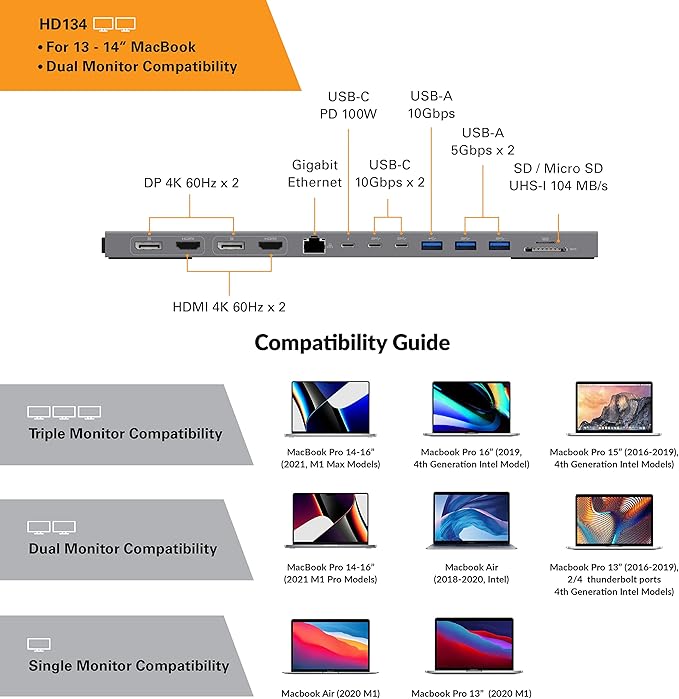
- Dual 4K Display Connectivity: Enhance your 13-14" MacBook, Chromebook, or PC with this MacBook dock that has the ability to connect to 2 extended displays at 4K60Hz using native HDMI or DisplayPort.
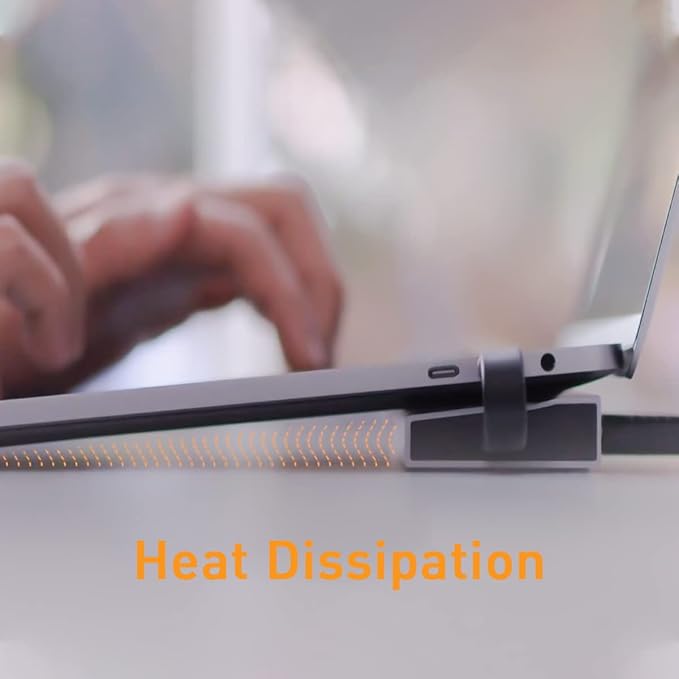
- Ergonomic Heat-Dissipating Design: This MacBook Pro dock’s advanced ergonomic design fits seamlessly underneath the chassis, elevating user experience and optimal heat dissipation.
- HDMI Docking Station with Flexible Display: Use HDMI or DisplayPort for dual display setups, providing the flexibility to connect to a variety of monitors and projectors to suit your needs.
- Comprehensive 13-Port Expansion: Featuring 13 essential ports including 2 HDMI 4K60Hz, 2 DP 4K60Hz, MicroSD/SD slots, Gigabit Ethernet, USB-C 10Gbps x2, USB-C PD 100W, USB-A 10Gbps, and 2 USB-A 5Gbps.
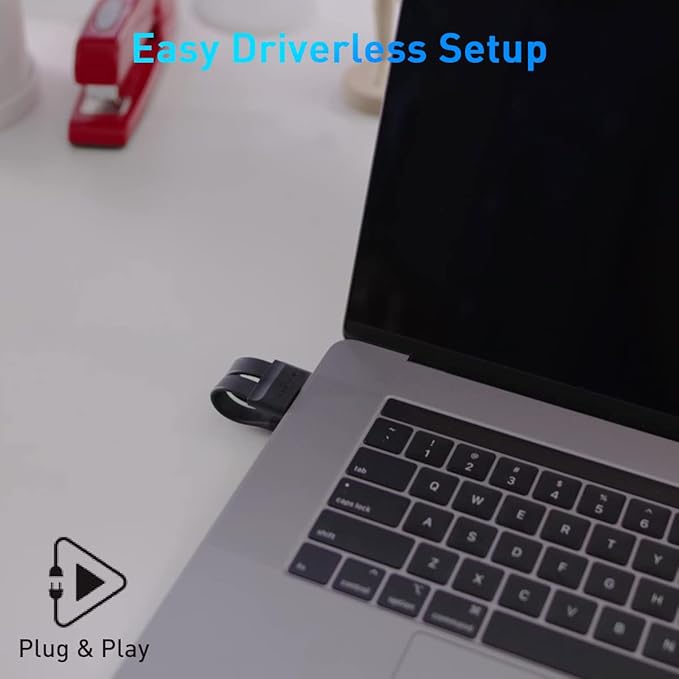
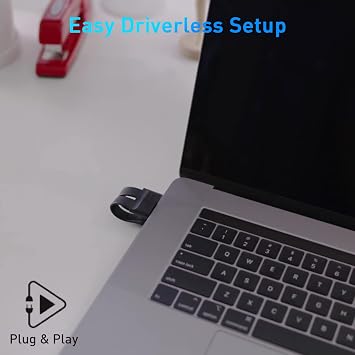
- Plug and Play Convenience: Enjoy an easy, driverless setup with this multiple USB port for laptop. Simply plug it in and you’re ready to go without the need for additional software downloads.
- Wide Compatibility: Compatible with MacBook Pro 13-14" (2016/later), MacBook Air 13-14" (2018/later), Windows PCs supporting MST, with dual Thunderbolt 3/4 or USB 3.0 or later Type-C with DP Alt-Mode.
- Optimize Your Workflow: These MacBook Pro docking stations are ideal for a wide range of users, including video editors, graphic designers, photographers, remote workers, gamers, and students.
- HYPER Innovation: Hyper’s sleek, compact designs focus on delivering all the ports and connections you need, backed by their reputation for cutting-edge IT and mobile accessories.
| Hardware Interface | Ethernet, HDMI, USB |
| Compatible Devices | MacBook Pro 2016 or later 13"-14"*, MacBook Air 2018 or Later 13"-14"*; Windows PC's supporting MST, with dual Thunderbolt 3/4, USB 3.0 or later Type C with DP Alt-Mode; M1/M2 MacBook (2020 MacBook 13"Air & 2020 MacBook 13"Pro) will not support multi-display connectivity, but will be compatible with the rest of the dock's ports. |
| Total Usb Ports | 6 |
| Number of Ports | 13 |
| Total Number of HDMI Ports | 2 |
| Wattage | 100 watts |
| Item Weight | 254 Grams |
| Color | 13 ports |
| Brand | Hyper |
| UPC | 817110015820 |
| Manufacturer | Hyper Products Inc |
| Model Number | HD134 |
| Mfr Part Number | HD134 |
| Compatible Devices | MacBook Pro 2016 or later 13"-14"*, MacBook Air 2018 or Later 13"-14"*; Windows PC's supporting MST, with dual Thunderbolt 3/4, USB 3.0 or later Type C with DP Alt-Mode; M1/M2 MacBook (2020 MacBook 13"Air & 2020 MacBook 13"Pro) will not support multi-display connectivity, but will be compatible with the rest of the dock's ports. See more |
| Total USB Ports | 6 |
| Total HDMI Ports | 2 |
Who Should Buy?

-
Creative Professionals
Ideal for designers and video editors needing multiple displays and high-resolution output for enhanced productivity.
-
Tech Enthusiasts
Perfect for users who require extensive connectivity options with multiple devices and accessories simultaneously.
-
Remote Workers
Great solution for remote workers seeking ergonomic setups with numerous ports for peripherals in a home office.

-
Casual Users
May not be suitable for everyday users who do not need multiple displays or extensive connectivity.
-
Budget-Conscious Buyers
Individuals looking for a more affordable docking option may find this product expensive for their needs.
-
Mobile Users
Not ideal for those frequently on the go due to its larger size and less portability compared to smaller docks.
Product Description
Have any Query? Chat with us
Customer Questions & Answers
-
Question:
What devices are compatible with the HyperDrive Multi-Display Docking Station?
Answer: The HyperDrive Multi-Display Docking Station is specifically designed for 13-14 inch MacBook models. It is fully compatible with MacBook Pro and MacBook Air models featuring USB-C ports. This docking station utilizes the latest USB-C technology, allowing seamless connectivity and enhanced performance. Users working with multiple displays, whether for gaming, content creation, or professional presentations, will find it beneficial for managing high-resolution outputs without sacrificing quality. -
Question:
Can I connect multiple displays using the HyperDrive Multi-Display Docking Station?
Answer: Yes, the HyperDrive Multi-Display Docking Station supports dual 4K HDMI and two DisplayPort outputs, allowing you to connect multiple monitors simultaneously. This feature is particularly useful for professionals working in graphic design, video editing, or other fields that require extensive screen real estate. By leveraging the high-definition capabilities of this docking station, you can expand your workspace and enhance productivity while providing stunning visual clarity. -
Question:
What is the power delivery capability of the HyperDrive docking station?
Answer: The HyperDrive Multi-Display Docking Station features USB-C Power Delivery (PD) with a maximum output of 100W. This allows you to charge your MacBook while using the docking station, ensuring you maintain power during extensive workflows. Users who often multitask or engage in resource-intensive activities will appreciate the convenience of continuous charging, making this docking station an essential accessory for professionals on the go. -
Question:
Does the HyperDrive Multi-Display Docking Station come with Ethernet support?
Answer: Yes, the HyperDrive Multi-Display Docking Station includes a Gigabit Ethernet port, ensuring stable and rapid internet connectivity. This feature is vital for streamlining tasks that require reliable online access, such as video conferencing, large file transfers, or data-intensive applications. Users can appreciate the seamless transition to wired internet, particularly in environments where Wi-Fi connectivity may be inconsistent. -
Question:
How many USB ports does the HyperDrive docking station have?
Answer: The HyperDrive Multi-Display Docking Station is equipped with three USB-A ports in addition to a USB-C port. These ports allow you to connect a variety of peripherals, such as external hard drives, flash drives, mice, and keyboards. This flexibility is particularly beneficial for individuals who switch between multiple devices and need versatile connections to enhance their productivity. -
Question:
Is the HyperDrive docking station portable for travel?
Answer: Yes, the HyperDrive Multi-Display Docking Station boasts a form-fitting design that complements 13-14 inch MacBooks, making it compact and easy to carry. Ideal for digital nomads or business professionals, this dock can easily fit into a laptop bag without adding significant bulk. Users who frequently travel while needing robust connectivity options will find this an ideal companion for presentations or meetings on the go. -
Question:
What resolution can I expect from the HDMI outputs of the HyperDrive docking station?
Answer: The HyperDrive Multi-Display Docking Station supports dual 4K resolution through its HDMI outputs, allowing crystal-clear visuals at 60Hz. This is particularly useful for media professionals, gamers, or anyone who values high-definition displays. By enabling smooth and vibrant visuals, users can enhance their overall experience during presentations, media consumption, or gaming sessions. -
Question:
Does the HyperDrive docking station require drivers for usage?
Answer: No, the HyperDrive Multi-Display Docking Station is plug-and-play, meaning it does not require any additional drivers for operation. Simply connect it to your MacBook, and you can start using all its features immediately. This convenience allows users to focus on their work rather than troubleshooting installation processes, making it especially appealing for those in fast-paced work environments. -
Question:
Can I use the HyperDrive docking station with non-Mac devices?
Answer: While the HyperDrive Multi-Display Docking Station is optimized for 13-14 inch MacBook models, it can also work with other USB-C compatible devices. However, certain features, like display output and power delivery, may vary based on the device’s compatibility. Users looking for a versatile docking solution can indeed connect various USB-C devices, but understanding compatibility limitations is key. -
Question:
Where can I buy the HyperDrive Multi-Display Docking Station?
Answer: You can buy the HyperDrive Multi-Display Docking Station at Ubuy. They offer a reliable platform for purchasing electronic accessories, ensuring you have access to the latest products. Whether you need the docking station for professional use or personal productivity, Ubuy provides a convenient shopping experience tailored to your needs in Laos.
Hyper Docking Stations HD134 Editorial Review


**** The HyperDrive Docking Station has garnered a mixed response from users, particularly among those who rely on high-performance connectivity for their MacBook Pro, especially the M1 MAX and M2 models. Many customers appreciate the expansive connectivity options, including triple 4K HDMI outputs, USB-A, USB-C, and SD card slots, which theoretically position this docking station as a powerful tool for creative professionals. However, practical usage often tells a different story. Common complaints revolve around connectivity reliability, with users reporting ongoing issues of the docking station necessitating multiple unplugging and replugging of cables to achieve a functioning connection. Designers and audio engineers have particularly highlighted how the dock fails to Consistently recognize USB devices, leading to frustrating downtime and inefficiencies in their workflow. Moreover, the dock exhibits significant heat generation during regular use, raising concerns about its longevity and additional stress on the laptop it is designed to complement. While some users found success in running dual monitors seamlessly, others experienced restrictions in functionality—with only two display ports operational at one time and confusion surrounding marketed specs versus actual performance. A notable design flaw seems to be its fit with certain MacBook models, where the dock appears to shift the laptop at an awkward angle, compromising usability. Support experiences mirror the product performance, with some users reporting vague responses or inadequate assistance with issues faced. Case returns are frequent, indicating that the dock may not meet the expectations set by its description and presentation. In summary, while the HyperDrive Docking Station is promising in its design and functionality, its reliability in daily use, particularly in professional settings, seems to leave much to be desired. **
Customer Reviews & Ratings
15 customers ratings
-
5 Star
40%
-
4 Star
13%
-
3 Star
14%
-
2 Star
0%
-
1 Star
33%
Review this product
Share your thoughts with other customers
Pros
- Expansive connectivity options (triple 4K HDMI, multiple USB ports)
- Functional dual external monitor support for some users
- Great initial setup experience for certain configurations
Cons
- Significant heat generation during use
Product Price History
Important information
- Limitations : For products shipped internationally, please note that any manufacturer warranty may not be valid; manufacturer service options may not be available; product manuals, instructions, and safety warnings may not be in destination country languages; the products (and accompanying materials) may not be designed in accordance with destination country standards, specifications, and labeling requirements; and the products may not conform to destination country voltage and other electrical standards (requiring use of an adapter or converter if appropriate). The recipient is responsible for assuring that the product can be lawfully imported to the destination country. When ordering from Ubuy or its affiliates, the recipient is the importer of record and must comply with all laws and regulations of the destination country.
- Not all the products listed on Ubuy are for sale, as Ubuy is a global search engine. Products are subject to export/trade regulations.
LAK 2768335
Order now and get it around Sunday, June 28
This item is not restrict in my country.(Please click on above link if this item is not restrict in your country, So our team will review and allow.)
QTY:
Secured transaction
Ubuy works hard to protect your security and privacy. Our advanced payment security system ensures confidentiality by encrypting your information during transmission using AES (Advanced Encryption Standards) and SSL (Secure Socket Layer) protocols. Your payment details are 100% secure as we do not share your payment details with third party sellers.
Our Top Logistics Partners
Fastest cross-border delivery
Features & Benefits
- Dual 4K display connectivity with native HDMI or DisplayPort.
- Ergonomic design promotes better heat dissipation.
- Comprehensive 13-port expansion for versatile connectivity.
- Easy plug and play setup with no additional software needed.
- Wide compatibility with MacBook and Windows PCs.
- Ideal for professionals, gamers, and remote workers.