- Home Page /
- Electronics /
- Computer Accessories /
- Computer Accessories & Peripherals /
- Audio & Video Accessories /
- Webcams & VoIP Equipment /
- Webcams /
- Logitech MX Brio Ultra HD 4K Collaboration, S...
0 ratings







Item #:
219378199
Logitech MX Brio Ultra HD 4K Collaboration, Streaming Webcam, 1080p at 60 FPS, Show Mode, Works with Microsoft Teams, Zoom, Google Meet, Nintendo
Item #:
219378199
LAK 5188571
Price Details
Excluding Shipping & Custom charges ( Shipping and custom charges will be calculated on checkout )
*All items will import from US
In stock
 Imported from USA store
QTY:
Order now and get it around Thursday, July 23
Secured transaction
Ubuy works hard to protect your security and privacy. Our advanced payment security system ensures confidentiality by encrypting your information during transmission using AES (Advanced Encryption Standards) and SSL (Secure Socket Layer) protocols. Your payment details are 100% secure as we do not share your payment details with third party sellers.
Our Top Logistics Partners


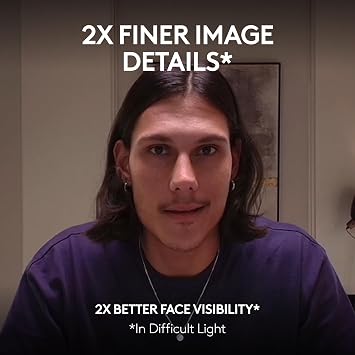
Experience ultra HD 4K resolution video with AI enhancements, giving you 2x better face visibility and 2x finer image details in difficult light.

Fast
Shipping

Free
Return*

Secure Packaging

100% Original Products

PCI DSS Compliance

ISO 27001 Certified


Note: Step Down Voltage Transformer required for using electronics products of US store (110-120). Recommended power converters Buy Now.


What Stands Out
Ultra HD Resolution
Experience stunning 4K video quality for professional-grade streaming and collaboration, ensuring crystal-clear visuals on all your virtual meetings and content creation.
60 FPS Output
Enjoy smooth and fluid video playback at 1080p at 60 frames per second, enhancing the quality of your streams and improving viewer engagement during live broadcasts.
Versatile Compatibility
Seamlessly integrates with popular platforms like Microsoft Teams, Zoom, and Google Meet, making it the perfect choice for professionals looking to enhance their online communication experience.
Product Details
- Compatible with Nintendo Switch 2’s new GameChat mode
- Ultra HD 4K webcam: meet or stream in 4K resolution at 30fps or 1080p at 60fps, with our most advanced webcam sensor yet, with 70% larger pixels (1) for sharp image quality
- AI-enhanced image quality: Experience 2x better face visibility with finer image details in difficult light (2), with auto-exposure, auto white balance, noise reduction, and autofocus
- Curate Your Image: Fine controls (3) on this Ultra HD webcam let you adjust lighting and white balance, such as ISO, Shutter Speed, Tint, and Vibrance, or let Auto mode take care of it
- Let Them Hear Your Every Word: Integrated dual beamforming noise-reducing microphones minimize background noise with the aid of AI to make sure you are clearly heard
- Share Your Work: Tilt down your Logitech webcam to share notes and sketches on your desk with Show Mode, allowing for better collaboration on calls
- No Sneak Peeks: To protect your privacy between meetings, simply rotate the built-in webcam cover to completely block the web camera
- Compatibility: This USB C webcam works with Windows, macOS, Chrome OS(4) or Linux (4). Certified for Zoom, Microsoft Teams, Chromebook, Google Meet, and Streamlabs
- Customize Your Workflow: Pairing the MX Brio with Logitech software (3) unlocks a bespoke video streaming experience that lets you control your stream through your MX keyboard and mouse
| Sensor Type | CMOS |
| Connectivity Technology | USB-C |
| Color | Pale Grey |
| Photo Sensor Size | 1/3-inch or larger (33 cm) |
| Water Resistance Level | Not Water Resistant |
| Has Image Stabilization | No |
| Form Factor | Compact |
| Style Name | Minimalist |
| Operating System | Windows 10 or later, macOS 10.15 or later, ChromeOS |
| Maximum Focal Length | 1 |
| Maximum Aperture | 1 Millimeters |
| Minimum Focal Length | 1 Millimeters |
| Lens Type | Zoom |
| Focus Type | Auto Focus |
| Video Resolution | 1080p |
| Video Capture Format | MP4 |
| Shooting Modes | Night |
| Image Aspect Ratio | 16:9 |
| Supported Image Format | JPEG |
| White Balance Settings | Auto |
| File Format | JPEG |
| Exposure Control Type | Manual or potentially other options |
| Effective Video Resolution | 3840 Pixels |
| Compatible Devices | Personal Computer, Chromebook |
| Brand | Logitech |
| Model Number | 960-001550 |
| Camcorder Type | Webcam |
| Model Name | BRIO Pro 701 |
| Built-In Media | Logitech BRIO Pro 701 Webcam - Off White |
| Antenna Location | Professional use (video conferencing, live streaming, content creation) and personal use (recording family events, video calls) |
| Are Batteries Included | No |
| Manufacturer | Logitech |
| UPC | 097855184702 |
| Unit Count | 1.0 Count |
| Screen Size | 7 Inches (17.8 cm) |
| Display Resolution Maximum | UHD |
| Flash Memory Type | Micro SD |
| Flash Memory Video Speed Class | V60 |
| Supported Audio Format | AAC, MP3, PCM, Dolby Digital/AC-3 |
| Zoom | Digital |
| Photo Sensor Technology | CMOS |
| Video Capture Resolution | 1080p |
| Item Weight | 0.6 lbs (270 grams) |
What's in the box
Logitech BRIO Pro 701 Webcam - Off White
Who Should Buy?

-
Remote Workers
Ideal for professionals needing high-quality video for virtual meetings on platforms like Zoom and Microsoft Teams.
-
Content Creators
Perfect for vloggers and streamers requiring excellent video quality and performance for live streaming or recording.
-
Gamers
Great for gamers wanting to enhance their streaming setup, providing clear visuals during gameplay and interaction.

-
Casual Users
May be overkill for users who only require basic webcam functionality for occasional calls or chats.
-
Budget Buyers
Those on a tight budget may find better value in lower-priced webcams designed for standard use.
-
Mobile Users
Less suitable for frequent travelers due to its size and need for stable mounts for optimal performance.
Product Description
Have any Query? Chat with us
Customer Questions & Answers
-
Question:
What video resolutions does the Logitech MX Brio support?
Answer: The Logitech MX Brio Ultra HD webcam supports multiple video resolutions, including 4K at 30 FPS and 1080p at 60 FPS. This flexibility allows users to choose a resolution that best fits their streaming needs. For instance, if high-definition video quality is essential for professional presentations or video conferencing, the 4K resolution ensures crystal-clear imagery, while 1080p at 60 FPS is ideal for fast-paced activities such as gaming or live broadcasts. -
Question:
Does the Logitech MX Brio work with popular video conferencing applications?
Answer: Yes, the Logitech MX Brio is compatible with a range of popular video conferencing applications, including Microsoft Teams, Zoom, and Google Meet. This compatibility makes it suitable for both professional and personal use, allowing seamless integration with meetings or chats. Whether you are working from home or attending virtual gatherings, the Brio ensures you present yourself effectively alongside high-quality audio and video. -
Question:
What is Show Mode on the Logitech MX Brio?
Answer: Show Mode is a unique feature of the Logitech MX Brio that allows for versatile video angle adjustments. When activated, this mode enables users to showcase physical objects such as documents or drawings during a video call. This is particularly useful for educators or presenters who want to share materials with their audience, enhancing the interactive experience and ensuring effective communication. -
Question:
Can the Logitech MX Brio be used for gaming?
Answer: Absolutely! The Logitech MX Brio is well-suited for gaming, supporting 1080p resolution at 60 FPS, which is optimal for a smooth streaming experience. Gamers can benefit from the webcam's excellent video quality to show their gameplay in real-time, making it a great companion for streaming platforms like Twitch or YouTube. Whether gaming competitively or casually, utilizing the Brio elevates the viewer's experience. -
Question:
What kind of microphone does the Logitech MX Brio include?
Answer: The Logitech MX Brio comes equipped with dual integrated omnidirectional microphones that capture audio from all directions. This feature enhances voice clarity during video calls and streaming sessions, making conversations more engaging. Whether in a conference or a gaming session, the mic quality helps to ensure that your audience hears you clearly without distractions from background noise. -
Question:
Is the Logitech MX Brio adjustable on a monitor?
Answer: Yes, the Logitech MX Brio features a versatile mounting clip that securely attaches the webcam to a variety of monitor sizes. This adjustable clip allows users to position the camera perfectly for optimal angles and frame composition. Whether you are sitting at your desk or using a laptop, the flexibility in placement makes it convenient for different setups, ensuring you always look your best. -
Question:
How does Logitech MX Brio handle low light conditions?
Answer: The Logitech MX Brio is equipped with HDR (High Dynamic Range) capabilities, which significantly enhances its performance in low light conditions. This feature automatically adjusts brightness and contrast, ensuring that you remain well-lit and visible during your video calls. This is especially beneficial if you are in a dimly lit environment, avoiding grainy or pixelated video outputs. -
Question:
Is the Logitech MX Brio suitable for professional settings?
Answer: Absolutely, the Logitech MX Brio is designed with professionals in mind, offering 4K video quality and advanced features ideal for business meetings and presentations. Its enhanced clarity and sharpness ensure that your appearance matches professional standards, fitting seamlessly into corporate environments. Many users find it essential for maintaining a polished, professional online presence during client calls and remote meetings. -
Question:
What are the system requirements for the Logitech MX Brio?
Answer: The Logitech MX Brio works with various operating systems, including Windows and macOS, and has a USB 3.0 interface for fast connectivity. To perform optimally, ensure your system meets the minimum requirements, which typically involve having an up-to-date operating system and a strong internet connection. This setup will optimize your video calls or streaming sessions without lag or connectivity issues. -
Question:
Where can I buy Logitech MX Brio Ultra HD webcam in Laos?
Answer: You can purchase the Logitech MX Brio Ultra HD 4K Collaboration Webcam on Ubuy, a trusted platform that offers a variety of products. Ubuy ensures a smooth shopping experience, allowing you to browse and select the best deals for this highly-rated webcam. It's a convenient option for securing this advanced technology directly to enhance your video conferencing and streaming capabilities.
Logitech Webcams 960-001550 Editorial Review
No editorial reviews found
Customer Reviews & Ratings
1293 customers ratings
-
5 Star
77%
-
4 Star
10%
-
3 Star
4%
-
2 Star
2%
-
1 Star
7%
Review this product
Share your thoughts with other customers
Platform Trust & Buyer Confidence

MT
Mohd
Verified buyer
“The product received very good packaging & safe…Thank You”
16 June 2026 · via Trustpilot
SJ
Shawati
Verified buyer
“Accurate delivery timing given”
16 June 2026 · via Trustpilot
YB
Youcef
Verified buyer
“Not madly expensive like I thought, and much quicker than promised.”
15 June 2026 · via Trustpilot
LM
Leila
Verified buyer
“Never dealt with Ubuy before, but everything worked out great. Seamless cross border purchasing and shipping. Thanks!”
6/7/2026 · via Trustpilot
KA
Kwame
Verified buyer
“The process was smooth, with clear communication and timelines. This was my 1st purchase and I am really impressed. I will definitely be coming back.”
12 June 2026 · via Trustpilot
Secure Checkout
Global Delivery
Easy Returns
Genuine Products
Product Price History
Important information
- Limitations : For products shipped internationally, please note that any manufacturer warranty may not be valid; manufacturer service options may not be available; product manuals, instructions, and safety warnings may not be in destination country languages; the products (and accompanying materials) may not be designed in accordance with destination country standards, specifications, and labeling requirements; and the products may not conform to destination country voltage and other electrical standards (requiring use of an adapter or converter if appropriate). The recipient is responsible for assuring that the product can be lawfully imported to the destination country. When ordering from Ubuy or its affiliates, the recipient is the importer of record and must comply with all laws and regulations of the destination country.
- Not all the products listed on Ubuy are for sale, as Ubuy is a global search engine. Products are subject to export/trade regulations.
LAK 5188571
Order now and get it around Thursday, July 23
This item is not restrict in my country.(Please click on above link if this item is not restrict in your country, So our team will review and allow.)
QTY:
Secured transaction
PCI DSS compliant and ISO 27001:2022 certified, with encrypted payments and full buyer protection on every order.
Our Top Logistics Partners
Fastest cross-border delivery
Features & Benefits
- Ultra HD 4K video at 30fps or 1080p at 60fps for stunning imagery.
- AI enhancements provide exceptional clarity and visibility, even in low light.
- Fine control options for adjusting lighting, white balance, and more.
- Dual omni-directional mics with noise reduction for clear audio.
- Sustainable design using recycled materials and low carbon aluminum.
- Compatible across multiple platforms including Windows, macOS, and most video conferencing tools.
Ubuy Assurance
Experience worry-free shopping with 100% original products, PCI DSS-compliant payment security, ISO 27001-certified data protection, the fastest cross-border delivery, free returns *, and secure packaging on every order.