- Home Page /
- Electronics /
- Computer Accessories /
- Computer Accessories & Peripherals /
- USB Hubs /
- Teamgee USB Data to Video Conversion Hub, HD ...
0 ratings







Item #:
127424054
Teamgee USB Data to Video Conversion Hub, HD Video Transfer Cable for Laptops with One Or No HDMI Port, Supports M1/M2/M3 MacBook Air/Pro and
77% of respondents would recommend this to a friend
Item #:
127424054
LAK 906615
Price Details
Excluding Shipping & Custom charges ( Shipping and custom charges will be calculated on checkout )
*All items will import from US
0 ratings
Write a review
In stock
 Imported from USA store
QTY:
Order now and get it around Friday, June 26
Secured transaction
Ubuy works hard to protect your security and privacy. Our advanced payment security system ensures confidentiality by encrypting your information during transmission using AES (Advanced Encryption Standards) and SSL (Secure Socket Layer) protocols. Your payment details are 100% secure as we do not share your payment details with third party sellers.
Our Top Logistics Partners


Supports USB video output for seamless monitor expansion and duplication.

Fast
Shipping

Free
Return*

Secure Packaging

100% Original Products

PCI DSS Compliance

ISO 27001 Certified


Note: Step Down Voltage Transformer required for using electronics products of US store (110-120). Recommended power converters Buy Now.


What Stands Out
Versatile Compatibility
Supports M1/M2/M3 MacBook models and Windows devices, offering seamless connectivity for laptops with limited HDMI ports, catering to various user needs.
High Definition Transfer
Delivers HD video quality, ensuring a sharp and clear output for presentations, gaming, or streaming, enhancing the overall user experience significantly.
User-Friendly Installation
Requires minimal setup with straightforward driver installation, making it accessible for users of all technical backgrounds, ensuring quick usability.
Product Details
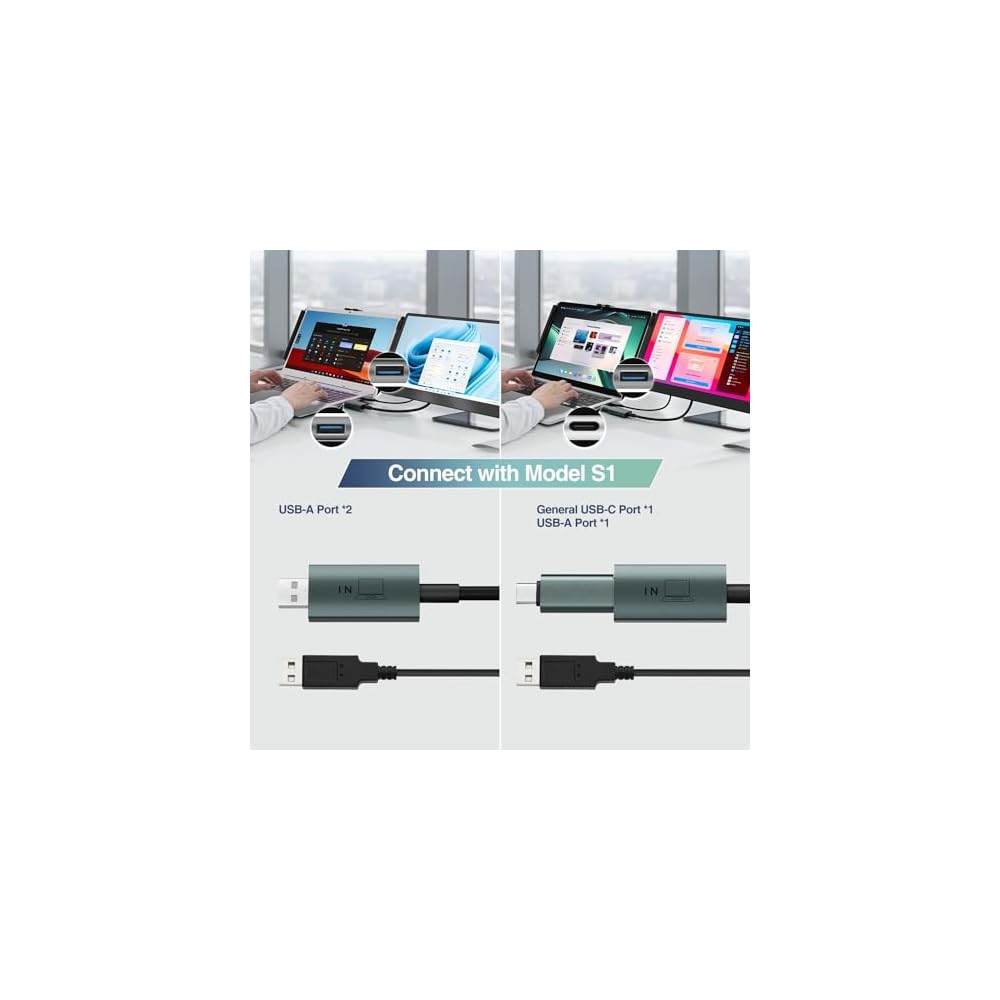
- ✔️Supports USB video output from desktop or laptop for monitor expansion and duplication.
- ❗Compatible with Mac OS (including M1/M2/M3 chips) and Windows operating system.
- ✔️Requires driver installation. Plug in the hub and install the driver that pops up.
- ❗Only for Teamgee S1/S2/S3/S6 monitors! Make sure to connect the H5-T hub to the [Type-C with DP] port on the back of the monitor.
- ✔️While connecting this hub, please connect an external 5V/2A power adapter to power the screen.
| Connector Type | USB Type A, USB Type C |
| Cable Type | USB Video Signal Conversion Cable |
| Compatible Devices | Laptop, Personal Computer |
| Other Special Features of the Product | USB to HDMI Conversion, Video Signal Transfer |
| Compatible Phone Models | No Compatible Phone Models |
| Connector Gender | Female-to-Female |
| Number of Pins | 28 |
| Maximum Voltage | 525 Millivolts |
| Connectivity Technology | USB |
| Specification Met | ANSI, CE, CEC, CL2, CL3, CSA, EIA, ETL, FCC, IEC, IEEE, IMSA, ISO, MFI, NEMA, NFPA, RoHS, SAE, TIA, UL, USB-IF |
| Indoor Outdoor Usage | Indoor |
| Color | Black |
| Brand Name | Teamgee |
| Model | H5-T |
| Manufacturer | Shenzhen Baijiayoupu Technology Co., Ltd. |
| Part Number | H5-T |
| Included Components | removable USB-C connector |
| Unit Count | 1.0 Count |
| Item Weight | 55 Grams |
| Number of Items | 1 |
| Brand | Teamgee |
| Special Feature | USB to HDMI Conversion, Video Signal Transfer |
What's in the box
removable USB-C connector
Who Should Buy?

-
Remote Workers
Ideal for remote workers needing to connect laptops to external displays for enhanced productivity and multitasking capabilities.
-
Students
Great for students who need to connect their laptops to projectors or external monitors during presentations and lectures.
-
Travel Professionals
Perfect for travel professionals requiring a compact solution to connect devices to various displays while on the go.

-
Gamers
May not provide the necessary performance and low latency required by gamers for an optimal gaming experience.
-
Multiple Display Users
Not suitable for users needing to connect multiple displays simultaneously, as it supports only one external output.
-
Casual Users
Casual users may find simpler solutions without the need for driver installations more suitable for their basic needs.
Product Description
Have any Query? Chat with us
Customer Questions & Answers
-
Question:
What is the Teamgee USB Data to Video Conversion Hub?
Answer: The Teamgee USB Data to Video Conversion Hub is an advanced cable designed to connect laptops that have limited or no HDMI ports to an external display. It enables HD video transfer, making it ideal for presentations, gaming, or streaming. This hub is particularly beneficial for users of M1, M2, and M3 MacBook Air/Pro models, accommodating their unique port configurations. When you require a robust solution for connecting your laptop to a larger screen, this hub offers versatility without compromising on video quality. -
Question:
How does the Teamgee USB Data to Video Conversion Hub work?
Answer: The hub functions by converting USB data signals from your laptop into video signals for an external monitor. It utilizes advanced algorithms to ensure high-definition output, making your visual experience seamless. This conversion is particularly advantageous for users who have devices that lack traditional HDMI ports. By connecting your laptop to a display via this hub, you can enhance your productivity by expanding your workspace, which is essential for tasks like multitasking during webinars or enjoying a cinematic experience while streaming. -
Question:
Is the Teamgee hub compatible with Windows laptops?
Answer: Yes, the Teamgee USB Data to Video Conversion Hub is compatible with Windows laptops that support USB video output. While it is optimized for use with M1, M2, and M3 MacBooks, it also serves Windows users well, as long as their USB ports meet the hub's requirements. This cross-platform compatibility is perfect for diverse settings, whether at the office or at home, enabling seamless connectivity to external displays for presentations or video conferencing sessions without hassle. -
Question:
What types of displays can I use with the Teamgee hub?
Answer: The Teamgee USB Data to Video Conversion Hub supports a variety of display types, including monitors, projectors, and TVs that accept HDMI inputs. This compatibility allows you to easily connect laptops to virtually any external display, making it an excellent choice for both professional presentations in conference rooms and home entertainment setups. Whether showing slideshows during meetings or enjoying movies, the ability to connect different display types enhances user flexibility and experience. -
Question:
Does the hub support audio transmission along with video?
Answer: Yes, the Teamgee USB Data to Video Conversion Hub supports audio transmission alongside video. This feature allows you to deliver sound through your external display’s speakers, creating a comprehensive multimedia experience. Whether you are watching videos or participating in a conference call, the seamless integration of audio and video makes your experience richer and more immersive. This is especially useful when using external monitors equipped with high-quality speakers. -
Question:
Can I use multiple displays with the Teamgee hub?
Answer: The Teamgee USB Data to Video Conversion Hub is designed to link one external display at a time. While it optimizes performance for single connections, if you require multiple displays, additional hubs might be necessary. However, if your workflow demands multiple monitors, this hub provides a solid option for adding a primary display while you manage other tasks on your laptop. This setup is great for creatives and professionals working with extensive visual data. -
Question:
What USB specifications does the Teamgee hub require?
Answer: The Teamgee USB Data to Video Conversion Hub requires a USB 3.0 or higher port for optimal performance. Using a USB 3.0 connection allows for fast data transmission and full HD video output. It is essential to ensure that your laptop is equipped with the appropriate USB port to achieve the best possible results when connecting to an external display. This ensures that tasks like video editing or gaming are smooth and high-quality. -
Question:
Is the installation of the Teamgee hub straightforward?
Answer: Yes, installation of the Teamgee USB Data to Video Conversion Hub is straightforward and user-friendly. Simply connect the hub to your laptop’s USB port, then connect your external display via the HDMI port. Most operating systems will automatically recognize the new display, which greatly simplifies the setup process. This makes it a reliable solution for users who may not be tech-savvy but want to enhance their viewing experience quickly. -
Question:
What is the maximum video resolution supported by the Teamgee hub?
Answer: The Teamgee USB Data to Video Conversion Hub supports up to 1080p HD video resolution. This ensures that you can enjoy sharp and clear images, whether you're working on documents or streaming your favorite shows. Such resolution is particularly beneficial for detailed visual tasks, allowing for an engaging experience, whether for gaming or professional use. This level of quality is essential for achieving a vibrant and crisp output on your external displays. -
Question:
Where can I buy the Teamgee USB Data to Video Conversion Hub?
Answer: You can purchase the Teamgee USB Data to Video Conversion Hub from Ubuy. Ubuy offers a reliable platform for obtaining this accessory, ensuring you have access to a high-quality solution for connecting your laptop to an external display. By shopping through Ubuy, you can conveniently find the right products tailored to your needs.
Teamgee USB Hubs Editorial Review
The Teamgee USB Data to Video Conversion Hub has garnered mixed reviews from customers, with notable highlights in usability for multi-screen setups, especially for those who travel frequently. Users appreciate the convenience of adding additional screens to a laptop with limited HDMI ports, making it a valuable tool for on-the-go professionals. The lightweight and compact design enhances its portability, reinforcing its suitability for mobile work environments. However, the product is not without its challenges. Several customers have reported difficulties with the installation process, citing poor quality instructions and confusion when it comes to locating and installing necessary drivers. Some users found the troubleshooting options lacking and had to figure out the installation steps independently, which is less than ideal. Additionally, there were complaints regarding performance issues, particularly with mouse lag on external displays connected through this hub, detracting from the overall user experience. In summary, while the Teamgee hub offers significant advantages in setting up additional monitors easily, users must navigate some installation hurdles, and the performance may not match that of native HDMI connections. **
Customer Reviews & Ratings
12 customers ratings
-
5 Star
54%
-
4 Star
0%
-
3 Star
26%
-
2 Star
0%
-
1 Star
20%
Review this product
Share your thoughts with other customers
Pros
- Easy setup for a multi-screen arrangement.
- Portable and lightweight design, ideal for travel.
- Cost-effective for the functionality it provides.
Cons
- Poor quality instructions can lead to frustration.
Product Price History
Important information
- Limitations : For products shipped internationally, please note that any manufacturer warranty may not be valid; manufacturer service options may not be available; product manuals, instructions, and safety warnings may not be in destination country languages; the products (and accompanying materials) may not be designed in accordance with destination country standards, specifications, and labeling requirements; and the products may not conform to destination country voltage and other electrical standards (requiring use of an adapter or converter if appropriate). The recipient is responsible for assuring that the product can be lawfully imported to the destination country. When ordering from Ubuy or its affiliates, the recipient is the importer of record and must comply with all laws and regulations of the destination country.
- Not all the products listed on Ubuy are for sale, as Ubuy is a global search engine. Products are subject to export/trade regulations.
LAK 906615
Order now and get it around Friday, June 26
This item is not restrict in my country.(Please click on above link if this item is not restrict in your country, So our team will review and allow.)
QTY:
Secured transaction
Ubuy works hard to protect your security and privacy. Our advanced payment security system ensures confidentiality by encrypting your information during transmission using AES (Advanced Encryption Standards) and SSL (Secure Socket Layer) protocols. Your payment details are 100% secure as we do not share your payment details with third party sellers.
Our Top Logistics Partners
Fastest cross-border delivery
Features & Benefits
- Easily expand your workspace with USB video output.
- Compatible with Mac OS (M1/M2/M3) and Windows.
- Simple driver installation process.
- Designed specifically for Teamgee S1/S2/S3/S6 monitors.
- Connect the hub to the Type-C with DP port for optimal performance.
- Requires external 5V/2A power adapter for screen connectivity.