0 ratings

Item #:
86986097
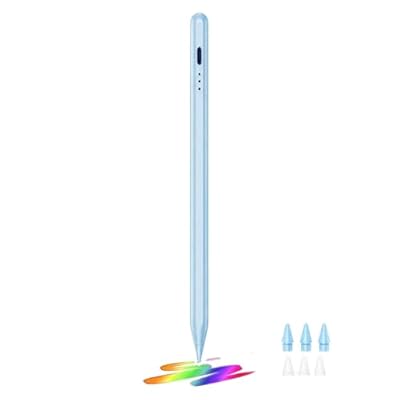
Stylus Pen for iPad 2018-2026, 3X Fast Charge Active Pencil for iPad A16 10th9th8th7th6th Gen, iPad Air 1113 M2M3543, Pro 1112.913 M4, Mini 56A17
Item #:
86986097
LAK 454483
Price Details
Excluding Shipping & Custom charges ( Shipping and custom charges will be calculated on checkout )
*All items will import from US
0 ratings
Write a review
In stock
 Imported from USA store
QTY:
Order now and get it around Tuesday, August 25
Secured transaction
Ubuy works hard to protect your security and privacy. Our advanced payment security system ensures confidentiality by encrypting your information during transmission using AES (Advanced Encryption Standards) and SSL (Secure Socket Layer) protocols. Your payment details are 100% secure as we do not share your payment details with third party sellers.
Our Top Logistics Partners


Enjoy a smooth and precise writing experience on your iPad with our affordable stylus pen, perfect for artists, students, and everyday users.

Fast
Shipping

Free
Return*

Secure Packaging

100% Original Products

PCI DSS Compliance

ISO 27001 Certified



Note: Step Down Voltage Transformer required for using electronics products of US store (110-120). Recommended power converters Buy Now.


What Stands Out
Fast Charging
Experience minimal downtime with rapid charging capability, allowing users to recharge in just moments and get back to creating, drawing, or annotating on their iPads efficiently.
Palm Rejection
Enjoy a natural writing experience without unwanted interruptions; the palm rejection technology allows users to rest their hand comfortably on the screen while writing or drawing.
Tilt Sensitivity
Achieve varied line thickness and shading with advanced tilt sensitivity, replicating natural pencil nuances for artists and note-takers aiming for enhanced precision and creativity on their iPads.
Product Details
| Number of Batteries | 1 Lithium Polymer batteries required. (included) |
| Battery Average Life Standby | 365 days |
| Compatible Devices | Tablet |
| Charging Time | 30 minutes |
| Minimum Required Operating System Version | iPadOS 13.4 |
| Color | Blue08 |
| Enclosure Material | Aluminum |
| Brand | JEDOUBAL |
| Model Number | 716 |
| Are Batteries Included | Yes |
| Are Batteries Required | Yes |
| Unit Count | 1.0 Count |
| Manufacturer | JEDOUBAL |
| Material | Aluminum |
| Batteries Required? | Yes |
| Item Weight | 0.2 lbs (90 grams) |
Who Should Buy?

-
Artists and Designers
Ideal for creating digital art and designs with precision, thanks to palm rejection and tilt sensitivity features.
-
Students and Note-Takers
Perfect for taking hand-written notes and annotating documents quickly and efficiently using an iPad.
-
Professionals on the Go
Great for business professionals who need to draw or write during meetings in a compact and portable form.

-
Casual Users
Not suitable for casual users who may not need advanced features like tilt sensitivity and palm rejection.
Product Description
Stylus Pen for iPad 2018-2026, 3X Fast Charge Active Pencil for iPad A16 10th9th8th7th6th Gen, iPad Air 1113 M2M3543, Pro 1112.913 M4, Mini 56A17 Pro, wPalm Rejection &Tilt Sensitivity
Have any Query? Chat with us
Customer Questions & Answers
-
Question:
What devices are compatible with the Stylus Pen for iPad?
Answer: The Stylus Pen is compatible with various iPad models, specifically the iPad Air 3, 4, and 5 (M2), iPad Mini 5 and 6, as well as iPad 6 through 10. This broad compatibility allows users to utilize the pen across multiple devices, making it a versatile tool for note-taking, drawing, and designing on different iPads. Whether you’re an artist or a student, you’ll have the convenience of using the same stylus across your devices. -
Question:
What features make this Stylus Pen ideal for drawing and note-taking?
Answer: The Stylus Pen offers advanced features like palm rejection and tilt sensitivity. Palm rejection allows you to rest your hand comfortably on the screen without interfering with your writing or drawing, resulting in a more natural experience. Tilt sensitivity enhances your creative output by adjusting the line thickness according to the angle of the pen, enabling detailed and intricate designs. These features create a seamless experience perfect for artists and students alike. -
Question:
How does the fast charging feature work for the Stylus Pen?
Answer: This Stylus Pen benefits from a fast charging feature that allows you to maximize usage time with minimal downtime. Simply connect the pen to a compatible charger or USB port for a quick charge, and you’ll be ready to go in a matter of minutes. This feature is particularly beneficial for users who may work on projects during time-sensitive situations, ensuring the pen is always ready when inspiration strikes. -
Question:
Can I use this Stylus Pen for gaming on my iPad?
Answer: Yes, the Stylus Pen can be used for gaming on your iPad, especially in games that support stylus input. Its precision and responsiveness allow for better control, making it an excellent choice for action games or drawing-based titles. Utilizing the stylus can enhance your gameplay experience by providing better navigation and control, especially in games requiring precision. -
Question:
Does the Stylus Pen require any additional software or apps to function?
Answer: No additional software or apps are required for the Stylus Pen to function with compatible iPads. As a plug-and-play device, it integrates seamlessly with the iPad's built-in applications like Notes, Procreate, and many others. This means you can start using it right away for sketching, handwriting, or editing without the need for extra installations, making it user-friendly for anyone. -
Question:
Is the Stylus Pen sensitive to different writing pressures?
Answer: Absolutely, the Stylus Pen features tilt sensitivity, which allows it to detect different pressure levels while you write or draw. This means you can use varying pressure to create thicker or thinner lines, mimicking the feel of traditional drawing instruments. This feature is particularly beneficial for artists seeking a more dynamic and expressive result in their work, enhancing their creative freedom. -
Question:
Can I use the Stylus Pen for digital art creation?
Answer: Yes, the Stylus Pen is highly suitable for digital art creation. With its palm rejection and tilt sensitivity, it provides a natural drawing experience similar to pen-on-paper. Many artists use it with applications like Procreate or Adobe Fresco, making it a preferred tool for both hobbyists and professionals aiming to produce detailed artwork or illustrations on their iPads. -
Question:
Will the Stylus Pen work with all iPad apps?
Answer: The Stylus Pen is designed to work seamlessly with a wide range of iPad apps that support stylus input. While most note-taking and drawing applications recognize the stylus automatically, compatibility may vary with certain games or non-drawing apps. It’s advisable to check each app’s specifications to ensure optimal performance, allowing you to leverage the pen in various creative scenarios. -
Question:
How long does the battery last on the Stylus Pen?
Answer: The battery life of the Stylus Pen varies depending on usage, but it typically provides several hours of continuous use on a full charge. For frequent users, this means less time spent charging and more time engaged in creative work or note-taking. Keeping a quick charger nearby can ensure that you can easily recharge between tasks, maximizing productivity without interruption. -
Question:
Where can I buy the Stylus Pen for iPad?
Answer: You can conveniently purchase the Stylus Pen for iPad on Ubuy in Laos. Ubuy provides a reliable platform with a user-friendly interface, ensuring a satisfying shopping experience. With access to various brands and models, you'll be able to find the perfect stylus that fits your needs, whether for professional use or casual creativity.
JEDOUBAL Stylus Pens 716 Editorial Review
The Stylus Pen for iPad has garnered a positive reception from users, highlighting its functionality and versatility across various Apple iPad models. Many reviewers praise the pen for its ease of use, noting how simply double-clicking the top turns the device on and activates a blue light. Users particularly love the palm rejection feature, which allows for a comfortable writing experience without accidental markings—an essential for those who like to rest their hand on the screen while working. The tilt sensitivity is another notable feature, enhancing the stylus's feel and providing a more natural writing or drawing experience. Many reviewers mention that the stylus works seamlessly with their devices, showcasing strong compatibility with multiple iPad models, including the iPad Pro and iPad Air. Users have also highlighted the robust battery life, appreciating that it lasts for an extended period before needing a recharge. While the performance of the stylus receives high marks, a common point of critique is the design of the charging cover. Several customers express concern over the potential to misplace the small piece that protects the charging spot, suggesting improvements could be made in that aspect. However, the overall sentiment reflects satisfaction and strong recommendations to others Considering a stylus for their iPads. **
Customer Reviews & Ratings
1 customers ratings
-
5 Star
100%
-
4 Star
0%
-
3 Star
0%
-
2 Star
0%
-
1 Star
0%
Review this product
Share your thoughts with other customers
Pros
- Great compatibility with multiple iPad models.
- Excellent palm rejection feature enhancing user comfort.
- Smooth tilt sensitivity, mimicking traditional writing.
- Impressive battery life for prolonged use.
- Variety of nibs included for different tasks.
Cons
- Small charging cover is easy to lose.
Platform Trust & Buyer Confidence

MA
Mohammad
Verified buyer
“Excellent quality and original too,when ubuy send original things I will appreciate that ,I very satisfied thank you”
23 July 2026 · via Trustpilot
CK
Chitra
Verified buyer
“The order and delivery progress was communicated very well. Package arrived within the estimated time. Products arrived as expected in good condition.”
22-Jul-26 · via Trustpilot
K
kund
Verified buyer
“Good supply of products. Safe payment methods, and shipment worldwide! Genuine products.”
23-Jul-26 · via Trustpilot
OO
Onesi
Verified buyer
“Was my first time buying a product from Ubuy, but I found it so helpful. This is reliable. Gonna place a new order!”
22 July 2026 · via Trustpilot
SJ
SAO JOHN
Verified buyer
“Ubuy is a great online platform to buy stuff. Reliable, fast delivery time and great value for money. I've been using Ubuy online shopping platform for three years now and will continue to do so.”
23 July 2026 · via Trustpilot
Secure Checkout
Global Delivery
Easy Returns
Genuine Products
Product Price History
Important information
- Limitations : For products shipped internationally, please note that any manufacturer warranty may not be valid; manufacturer service options may not be available; product manuals, instructions, and safety warnings may not be in destination country languages; the products (and accompanying materials) may not be designed in accordance with destination country standards, specifications, and labeling requirements; and the products may not conform to destination country voltage and other electrical standards (requiring use of an adapter or converter if appropriate). The recipient is responsible for assuring that the product can be lawfully imported to the destination country. When ordering from Ubuy or its affiliates, the recipient is the importer of record and must comply with all laws and regulations of the destination country.
- Not all the products listed on Ubuy are for sale, as Ubuy is a global search engine. Products are subject to export/trade regulations.
LAK 454483
Order now and get it around Tuesday, August 25
This item is not restrict in my country.(Please click on above link if this item is not restrict in your country, So our team will review and allow.)
QTY:
Secured transaction
PCI DSS compliant and ISO 27001:2022 certified, with encrypted payments and full buyer protection on every order.
Our Top Logistics Partners
Fastest cross-border delivery
Features & Benefits
- Affordable alternative to Apple Pencil for iPad users.
- No Bluetooth required; easy and instant use.
- Features 9-10 hours working time and 365 days standby.
- Palm rejection and tilt sensitivity for artistic precision.
- 1.5mm ultra-fine tip for smooth writing and sketching.
- Compatible with various iPad models from 2018 onwards.
Ubuy Assurance
Experience worry-free shopping with 100% original products, PCI DSS-compliant payment security, ISO 27001-certified data protection, the fastest cross-border delivery, free returns *, and secure packaging on every order.